
Contact Form Not Sending Email in WordPress? Fix It for Any Plugin
Your form says 'Thanks, we got it!' but the notification never shows up. Here's why that happens, how to fix it in any form plugin, and how to confirm it's fixed.

Your contact form says "Thanks, we got it!" The entry is sitting in your dashboard. And the email that should tell you about it never arrives. Maybe a customer wrote to ask why nobody answered. Maybe you just tested it yourself and nothing came.
You didn't break anything, and this is fixable, usually in a few minutes. Here's the short version: your form plugin handed the email to WordPress, and WordPress handed it to your web host, which either dropped it or sent it in a way that Gmail and Yahoo don't trust. The fix is to send WordPress mail through a service built for it, from an address on your own domain, with DNS records that prove the mail is yours.
Here's what we'll do: look at why this happens, check the settings in your form plugin, then send a test and confirm it went out. Jump to your plugin's section if you already know which one you use.
Why your form saves the entry but the email never arrives
Saving an entry and sending an email are two separate jobs. The first happens inside your site, so it works. The second has to leave your site and get past someone else's front door, and that's where it goes wrong. Three causes cover most cases.
Your host's PHP mail is blocked, throttled or filtered. By default, WordPress sends mail straight from your web server. Many hosts block or throttle outbound port 25 and PHP mail, so the message never leaves. Think of it as a letter handed to a mailroom that quietly throws some of them out.
The From address isn't on your domain. Say your form sends a notification "from" a visitor's Gmail address, or from an address at a domain that isn't your site's. Gmail sees an email claiming to come from one place while it arrives from another. That looks like forgery, and it's treated like forgery.
Nothing proves the email is really yours. Since February 2024, Gmail and Yahoo require senders to authenticate their mail. That means DNS records that act like a signature on a check: SPF says which servers may send for your domain, and DKIM is a signature the receiver can verify. Bulk senders also need DMARC, a record that tells receivers what to do when those checks fail. Without them, your mail goes to spam or gets refused.
One more thing to watch for: two SPF records on one domain break SPF entirely. If you add one, edit the existing record. Don't add a second.
Check the easy things first
Before changing anything big, spend two minutes here.
- Look in the spam folder of the address that should receive the notification. If it's there, your problem is trust, not delivery, and the From and authentication fixes below are the ones for you.
- Check that the "send to" address in the form's notification is spelled right and is a real mailbox.
- Check that the From address uses your own domain, like hello@yourdomain.com, rather than a visitor's address or a free webmail address.
- Send yourself a test entry from a private browser window, so you know the result is current.
If all of that looks right and the email still doesn't come, the problem is almost certainly the sending itself. Skip down to the SendWP section.
Where each form plugin keeps its email settings
Every form plugin has two settings that matter: where the notification goes, and who it appears to come from. The screens differ, but those two settings are always there.
Contact Form 7
The notification lives in the Mail tab of each form. Check the To field and the From field there. We wrote a whole post on this one, so if that's your plugin, read Contact Form 7 not sending email next.
WPForms
Notifications are set per form, in the form's settings under Notifications. Look at the Send To Email Address and From Email fields.
Ninja Forms
Emails and actions are managed in the form's Emails & Actions tab. Open the email action and check the To and From addresses. SendWP was originally created for Ninja Forms, and there's a guide in our docs: using SendWP with Ninja Forms.
Gravity Forms
Each form has its own Notifications screen under its settings. Check the Send To and From Email fields on the notification itself.
Elementor Forms
The email is set in the form widget's Email action inside the Elementor editor. Check To and From Email there, and make sure the From address belongs to your site's domain.
Forminator, Formidable, SureForms and the rest
Other form plugins work the same way. Open the form's notification or email settings, then check who the email goes to and the address it comes from.
If the settings are right and the email still doesn't arrive
Then the form plugin isn't the problem. Changing the To address won't help, because the email never gets a clean trip out of your server. Fixing it in each plugin separately also leaves your other WordPress emails exposed: WooCommerce order receipts, membership and course emails, admin alerts. Password resets fail the same way, and we cover that in WordPress password reset email not sending.
So for most sites, the move is to fix sending once, for everything. You have two honest options.
If you already use a sending service you're happy with, a free SMTP plugin is all you need. Free plugins give you a pipe and a log, and for a site with a good provider behind it, that's enough. If you'd like to see how that compares, we put it on our compare page.
If you don't have a provider and don't want to become an email administrator, that's where we come in.
Fix it once for every form with SendWP
SendWP is a transactional email service for WordPress. You install a plugin, connect it, and every email WordPress sends, including your form notifications, goes out through SendWP instead of your host's PHP mail. Your form plugin doesn't need to change. It still hands the email to WordPress, and WordPress now hands it to us.
Here's what that looks like. The full walkthrough is in getting started.
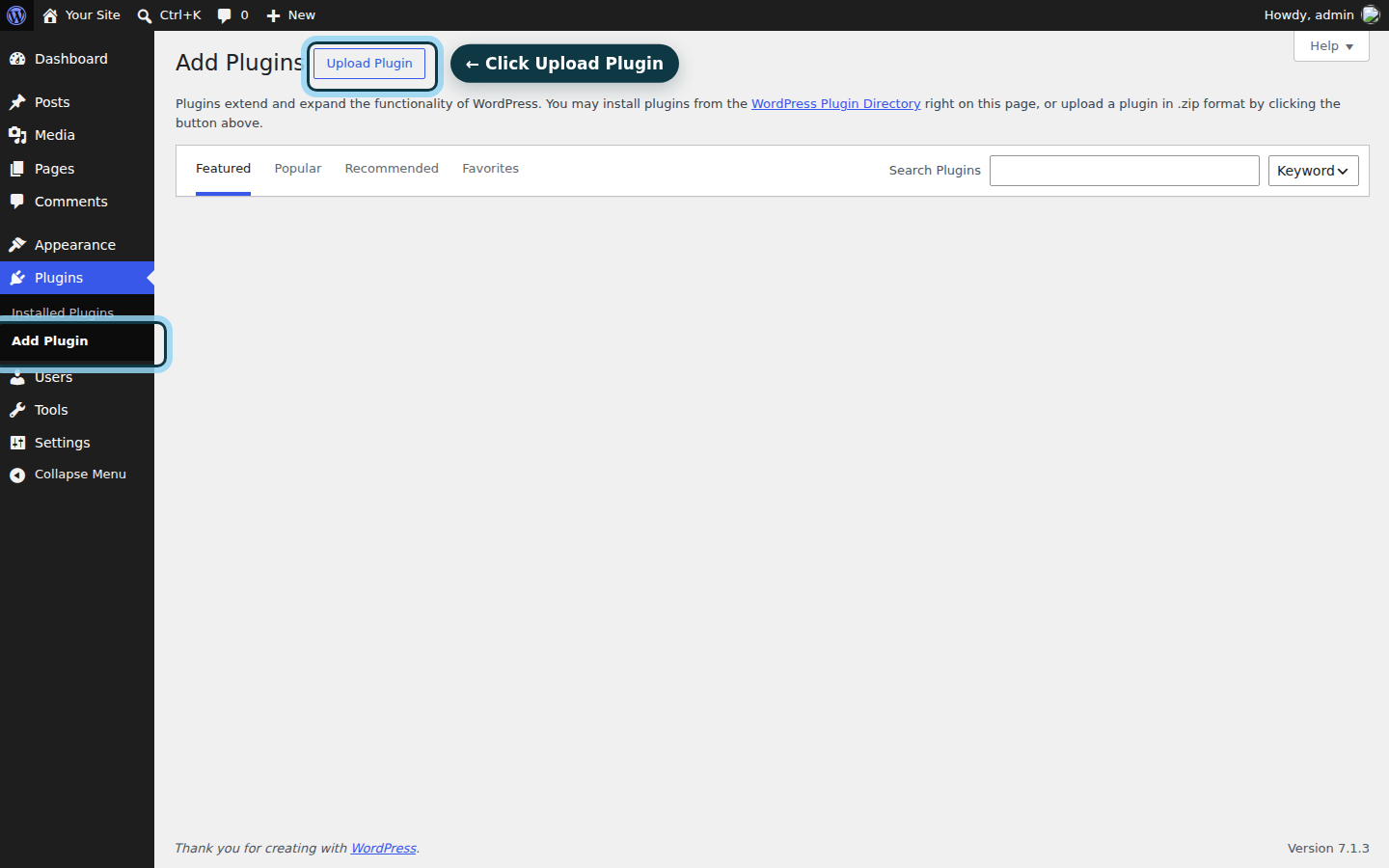
In your dashboard, go to Plugins, then Add Plugin, and upload the SendWP zip.
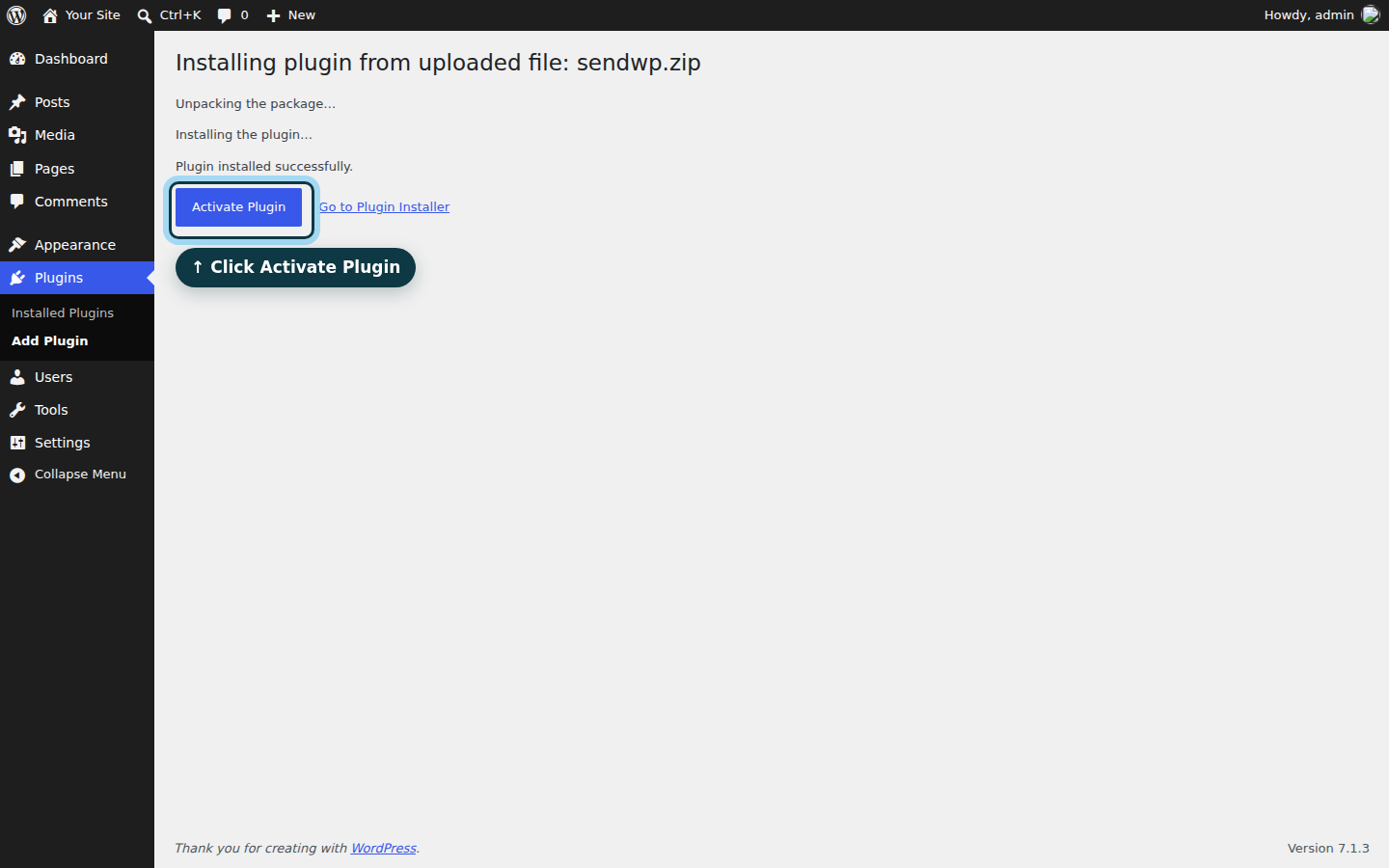
Install it and activate it.
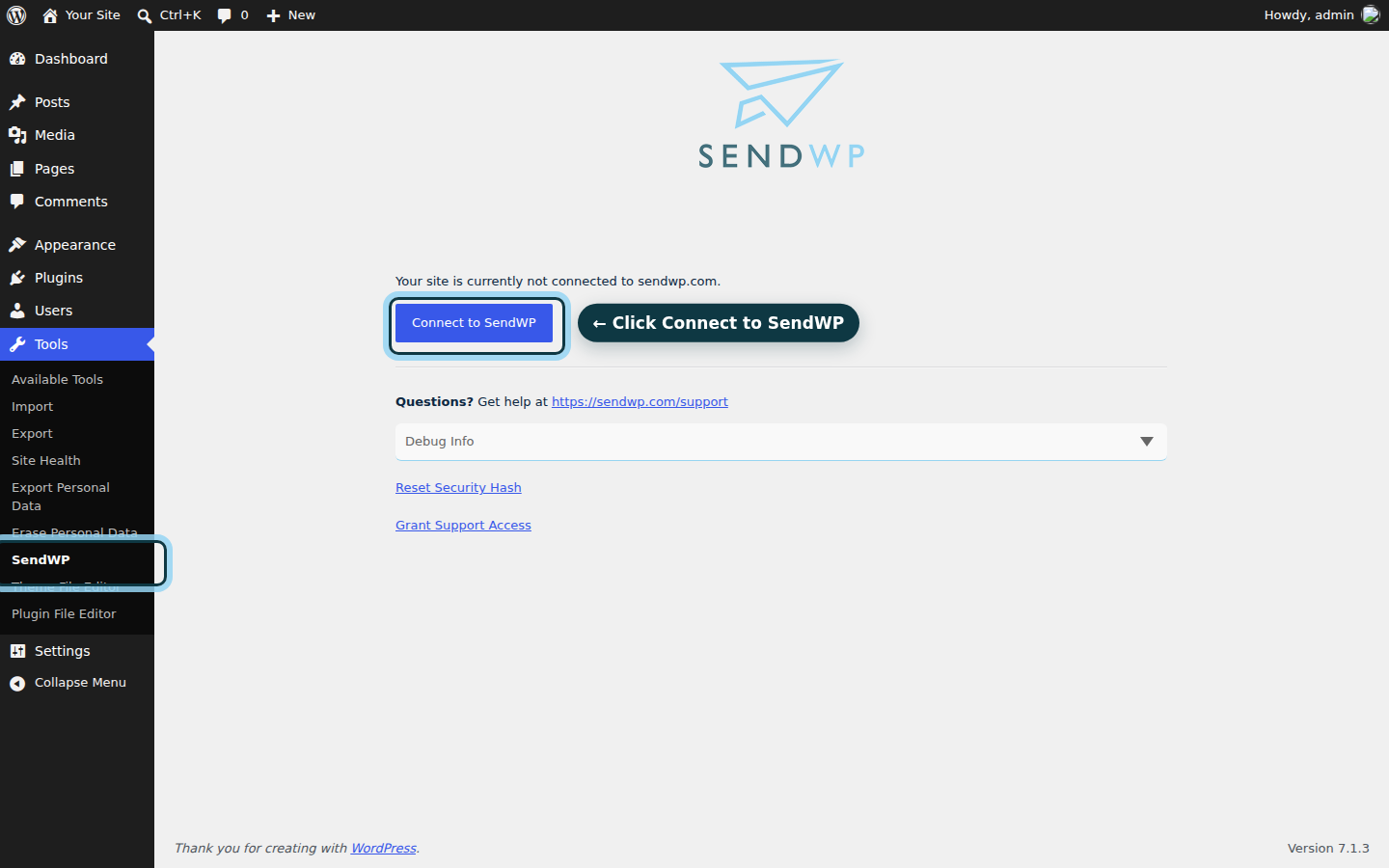
Then open SendWP under Tools and connect your site.
That's the sending part. Two more pieces make it trustworthy.
Use a From address on your own domain. Set your form's From address to something like hello@yourdomain.com, then add the DNS records so receivers can see the mail is really yours. We help with domain authentication, and the steps are in our guide to authenticating your domain. One detail that saves a headache: our DKIM record is always a CNAME, never a TXT record, so if a DNS screen offers you a choice, pick CNAME. If you want a basic DMARC record, we can tell you the most basic one to publish. That's as far as our DMARC help goes: we don't give policy advice or read DMARC reports.
Check the log. SendWP keeps email logs for 30 days. After you send a test entry, open the log and look for your form notification. If it's there, it went out. If something bounced, you'll see it in the log, along with complaints, so you can look there instead of waiting for a customer to tell you.
One honest limit. SendWP counts spam complaints for your site on its Deliverability page. It doesn't show opens or clicks, and it doesn't offer dedicated IP addresses or real-time monitoring. What it does is send your WordPress mail, help you authenticate it, and let you see what happened.
We also keep guides for specific plugins on the integrations page, and if you get stuck, ask us.
Send a test and confirm it worked
Submit your form once more, from a private window, with an email address you can open. Then check three places: the inbox of the address that receives notifications, its spam folder, and the SendWP log. If the message shows in the log and in your inbox, you're done. If it shows in the log but lands in spam, go back and check your From address and DNS records. That's nearly always the gap.
Your forms now send mail with proper ID, and you can see the log if something goes quiet. Nice work.
If you'd like this off your plate, you can get started with SendWP for $1 your first month. Nonprofits can also ask about the nonprofit discount.