
Web forms are one of the most versatile tools to implement on WordPress sites. Whether you’re collecting leads or processing payments, forms are the easiest way to capture consumer data and build relationships with customers. Plus, they’re beneficial for any — and we mean any — type of website. Form use cases include:
- Payments and donations
- User logins
- Event registrations
- Newsletter subscriptions
- Online course enrollments
- Surveys and feedback
- Plus many more!
Forms pave the way for virtually every transaction on your WordPress site. And, with the help of a WordPress form-building plugin, it’s not necessary to build these forms from scratch. In fact, coding experience isn’t needed at all.
Let’s explore one of SendWP’s partner plugins: a fantastic tool called Ninja Forms. We’ll also reveal how SendWP enables the essential second step to form submissions — and how to integrate the plugins in the WordPress dashboard.
Ninja Forms at a glance

Ninja Forms helps users create beautiful, intuitive web forms for payments, lead generation, member registrations, and beyond. Featuring a foolproof interface, Ninja Forms couldn’t be easier to use, even if you’re a complete tech novice. Simply drag and drop the desired fields to build your form. Or, choose from a selection of ready-made templates that require little — if any — customization. Either way, the forms match your WordPress theme’s design, ensuring a cohesive and professional appearance.
Free features
Ninja Forms is a freemium tool — the plugin costs nothing to install and includes an excellent set of starter features, such as:
- 28+ form field types
- Field validation
- Unlimited forms and form submissions
- Customizable templates
- Mobile responsiveness
- Advanced calculations
- Support for 16+ languages
- Spam protection
- Regular platform updates
- And more
As you can see, the free plugin has much to offer. Unlike many other form builders, Ninja Forms offers dedicated support to free users.
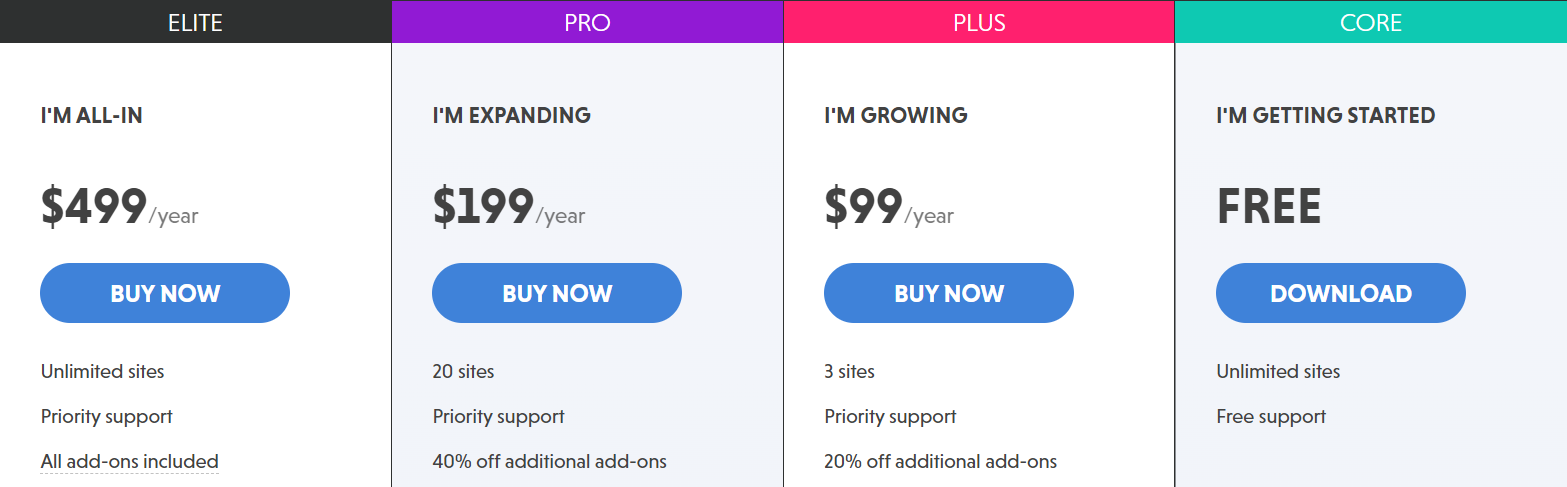
So, a premium plan (starting at $99/year) may not be needed. But, if you’re looking for additional features and functions, Ninja Forms has plenty more up its sleeve.
Advanced features
Advanced features can take your forms to the next level. For example, with multi-step forms, you can split longer forms into several steps so users aren’t overwhelmed by too many fields. And with conditional logic, forms become dynamic, responding in real-time according to user input.
Other premium Ninja Forms features include file uploads, save progress, additional layouts and styles, an advanced datepicker, and more.
Ninja Forms add-ons

Ninja Forms also offers add-ons with third-party tools to support some vital form functionalities. These are available in Ninja Forms’ Plus, Pro, and Elite plans. However, they can be purchased individually if you only need one or two tools. This à-la-carte offering makes Ninja Forms an ultra-flexible plugin that meets any user need.
Payment gateways
Are you an eCommerce shop owner, a nonprofit organizer, or in another industry where collecting payments or donations is essential? Ninja Forms’ payment add-ons are for you. These tools process payments and allow customers and supporters to pay via different methods, from credit cards to Google Pay. Ninja Forms supports five payment extensions, including PayPal, Stripe, and Authorize.net.
Email marketing
Maybe email marketing is central to your business, and you’ll use Ninja Forms for email subscriptions. Great! But things get complicated when your email marketing tool and form plugin don’t integrate smoothly. This isn’t a concern for Ninja Forms users. Add-ons with Mailchimp, Constant Contact, ActiveCampaign, AWeber, and other email services make managing your email list a breeze.
CRMs
Customer relationship management (CRM) tools are a must as your brand grows. From sales and marketing to accounting, CRMs keep every department on the same page and streamline internal workflows. Ninja Forms’ CRM extensions include some of the biggest names in the game, like Salesforce and HubSpot.
Communication and project management
Speaking of internal workflows, wouldn’t it be nice if form submissions instantly integrated with your typical workday tools? Well, now they can. Get a Slack notification or generate a Trello card each time someone fills out a form on your site. You can even receive real-time text notifications with ClickSend or Twilio.
Form submitted — now what?
Users deserve clarity after submitting forms on your website. Did their payment go through? Are they subscribed? Was their password successfully changed? Even if you’ve enabled success notifications, email confirmations provide additional clarity — a digital trail they can refer back to.
By integrating SendWP with Ninja Forms, this essential next step happens automatically and reliably. Customers receive their transactional emails on time, without any effort on your part. SendWP helps ensure a 99.5% deliverability rate, which means confirmation and notification emails land in the primary inbox where they belong, rather than being sent to the spam folder. (Or, even worse, disappearing in the email ether entirely — a common problem with WordPress’ native email functionality).
How to connect SendWP and Ninja Forms
As mentioned at the beginning of this post, SendWP and Ninja Forms are official partners. SendWP was originally created for Ninja Forms, before it grew to support other brands, platforms, and plugins. This close connection means the two services work seamlessly, and connecting them is as simple as a few clicks.
Get started by downloading and installing Ninja Forms in WordPress. On your dashboard, go to “Plugins” > “Add New.” Search for Ninja Forms and click “Install,” followed by “Activate.” This is for the free plugin. You can upgrade to a premium plan or install an individual add-on at any time.
Now, Ninja Forms will be on the left-side menu of the WordPress dashboard. Select it, and then choose the “Services” sub-menu. Under “SendWP,” click “Setup.”
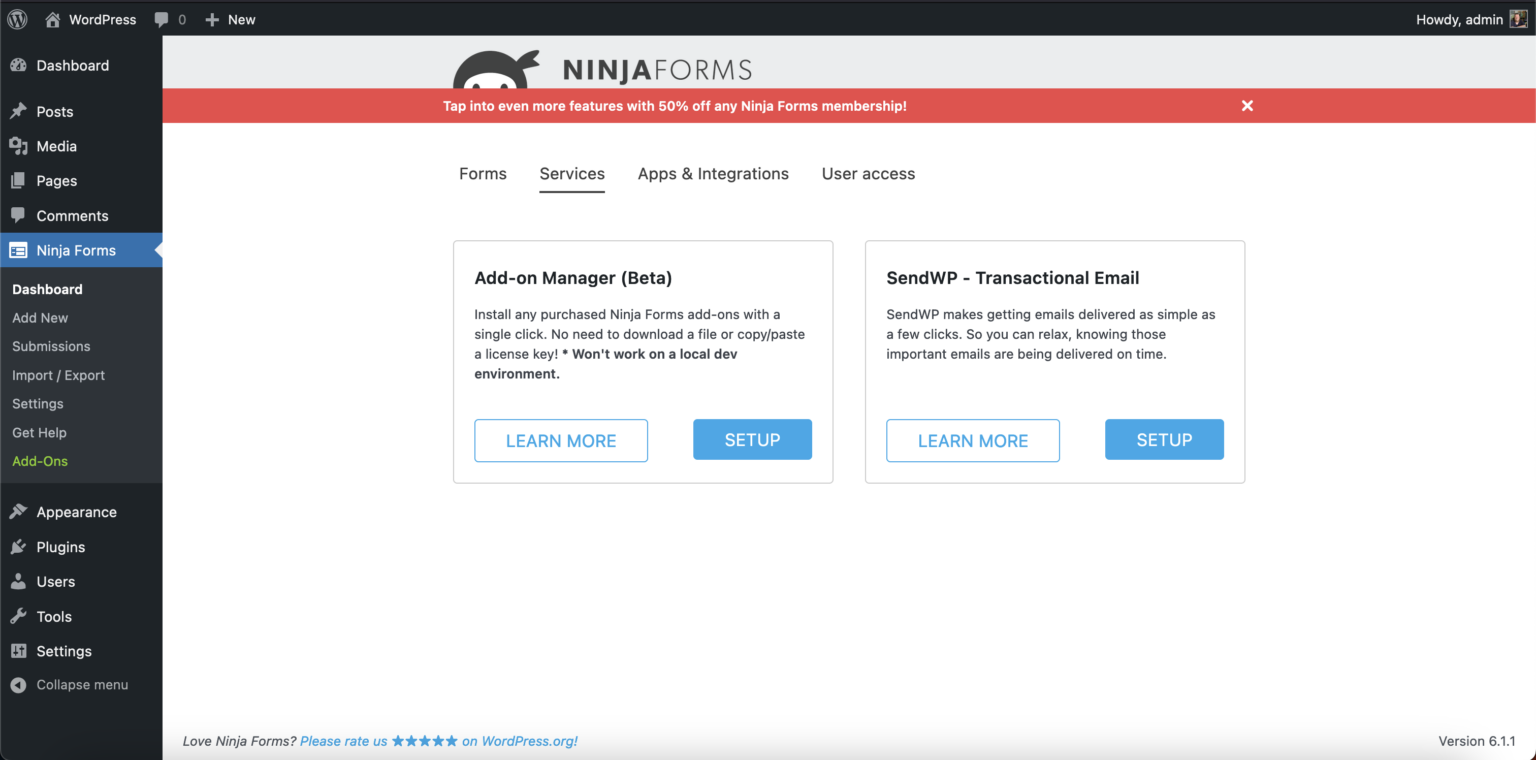
The “Setup” button redirects you to log in (for existing SendWP customers) or register for a new account. Once logged in or after completing registration and payment, the job is done. SendWP will now manage all transactional emails for Ninja Forms form submissions.
In perfect form
Forms empower consumers to interact with your brand, and they allow you to capture the data and information necessary to support their needs — from providing goods and services to running insightful marketing campaigns. Ninja Forms makes it all possible, delivering an incredible experience for form creators and users alike.
But the journey shouldn’t end with form submission. SendWP ensures a smooth next step by sending transactional emails — and offering peace of mind through astonishing deliverability rates.
SendWP and Ninja Forms are engineered to work in harmony. This partnership is the ideal blend of form and function, so get started today by following the steps outlined above.
Let SendWP Handle Your Emails!
Say goodbye to email delivery headaches with SendWP. Our efficient and reliable solution ensures that your important messages reach their destination on time, every time.

I talked with Matt and he provided wonderful customer service. In a ecosystem of developers and plugin authors, SendWP stands out in a great way by offering respectful and helpful service. It’s not enough to have a great plugin, but to also have great customer skills. I think that’s how the cream rises to the top. Thank you Matt and SendWP!