No one enjoys receiving spam. Unfortunately, junk mail is a fact of life for any email user, and we’re accustomed to marking unwanted messages as spam. Whether it’s an unsolicited sales message or a phishing scheme, email service providers (ESPs) take spam complaints seriously. However, this protective measure can backfire, leading to legitimate messages being marked as spam.
Senders can, and should, take steps to lower their spam complaint rate. It’s not just a wise move — some of the industry’s biggest email providers require it. Let’s learn more about spam, Google’s email policies for 2024, and 10 ways bulk senders can keep their spam complaint rates low.
Table of contents
- What is spam email?
- Spam complaint rate
- 10 ways to keep your spam rate below 0.3%
- What happens when your spam rate is too high?
- Gmail and Yahoo’s email policies for 2024
What is spam email?
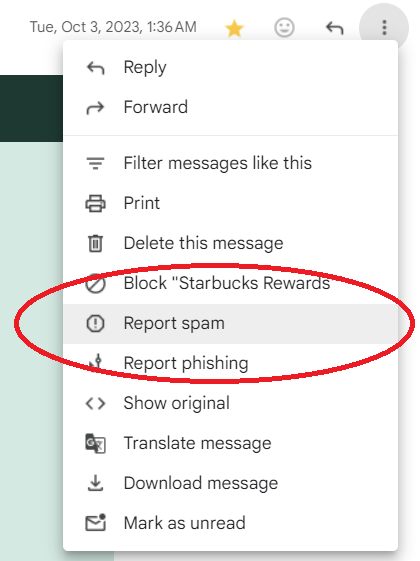
Spam is an unsolicited and unwanted email. It comes in various forms, from harmless yet irritating promotional emails to downright dangerous phishing attempts. The innocuous ones clutter your inbox, while the malicious ones aim to steal your personal information or infect your device with malware.
Phishing attacks, for instance, masquerade as legitimate entities to trick recipients into divulging sensitive information, like passwords or financial details. Spoofing, another scary tactic, involves forging the sender’s email address to deceive recipients into thinking the email is from a trusted source.
ESPs do a decent job of blocking spam, but some messages will always slip through. When this occurs, ESPs encourage email users to file a spam complaint.
Spam complaint rate
Senders rely on email analytics to gain clarity and improve email performance. Most email services (including SendWP) offer email analytics as part of their packages. These metrics include open rate, click-through rate, and, most importantly for this article, spam complaint rate.
The spam rate represents the percentage of emails marked as spam out of the total emails sent. Here’s how to calculate it:
(Spam complaints ÷ emails delivered) X 100
For example, let’s say 1,000 of your emails were successfully delivered during a 30-day period. Five were marked as spam, your spam complaint rate for that month would be:
5 ÷ 1,000 = 0.005
0.005 X 100 = 0.5
Your spam complaint rate is 0.5%. Sounds pretty low, right? Well, this is actually considered too high in the email industry. As we’ll explore later, the latest email policies for 2024 mean you should aim for a 0.3% spam rate or lower.
TIP: Remember to calculate the spam rate using the number of emails delivered, not sent.
The spam complaint rate metric is invaluable, offering insight into how recipients and email service providers perceive your messages. When your rate is too high, it’s essential to take steps to lower it. Below, we’ll provide 10 strategies for accomplishing just that.
10 ways to keep your spam rate below 0.3%
Spam complaints are frustrating for any legitimate sender, but you can keep your complaint rate low by paying careful attention to your content and email list management. Follow these 10 strategies to reduce spam complaints:
Write relevant and engaging emails
Each message should resonate with your audience’s interests and preferences. Craft compelling subject lines and content that captivates their attention from the moment they open your email. By delivering value and relevance, you reduce the likelihood of recipients flagging your messages as spam.
Be honest
Transparency is paramount in email communication. Clearly communicate the purpose of your email — and why they’re receiving it — along with ensuring the content aligns with recipients’ expectations. For example, don’t use a subject line like “Important Account Updates” to trick recipients into opening a purely promotional email. Misleading or deceptive tactics not only damage your credibility but also increase the risk of spam complaints.
Personalize messages
Address recipients by name and leverage data to personalize content based on their past interactions and preferences. Personalization demonstrates that you value each recipient as an individual, fostering a sense of connection and relevance. By delivering tailored content, you enhance engagement and decrease the likelihood of your emails being perceived as spam.
Avoid spammy language
Certain words and formatting can trigger spam filters — or raise your recipients’ suspicions. Avoid spammy language like “Free,” “Prize,” “Act Now,” and more, along with excessive capitalization and exclamation marks. Instead, focus on providing value and solving recipients’ problems genuinely and authentically. By maintaining a conversational tone and avoiding overly promotional language, you increase the chances of your emails bypassing spam filters and resonating with recipients.
Don’t bombard recipients
Respect your audience’s inbox space by maintaining a consistent, yet reasonable, sending frequency. Bombarding recipients with frequent emails can overwhelm them and lead to frustration, prompting them to mark your messages as spam. It’s all about balance: Your goal is to stay top-of-mind without overdoing it.
Segment your audience
Divide your email list into segments based on demographics, behavior, or preferences to make your messages even more relevant. By segmenting your audience, you can tailor your messages to resonate with specific groups, increasing engagement and reducing the likelihood of spam complaints. Use customer data and analytics to identify segmentation opportunities and create personalized experiences for each segment.
Ask recipients to opt-in
You’re far less likely to receive spam complaints when your recipients actually want to hear from your brand. Build your email list organically, and acquire explicit consent from subscribers through opt-in or double opt-in mechanisms. Never purchase email lists or “trick” people into subscribing (like pre-checking a subscribe box on a payment form). These unwise practices won’t just increase your spam complaint rate — they may even break federal regulations like CAN-SPAM and the GDPR.
Periodically clean your email list
Regularly review and clean your email list to remove inactive or disengaged subscribers. Sending emails to unresponsive or disinterested recipients not only reduces engagement but also increases the likelihood of spam complaints. If you want to win back inactive subscribers, try a re-engagement campaign. Still crickets? It is time to remove those email addresses from your list.
One-click unsubscribe
The email regulations mentioned above (CAN-SPAM and GDPR) require email senders to include an unsubscribe option in their emails. But as of 2024, Gmail and Yahoo have taken this a step further by requiring one-click unsubscribe. Don’t make your recipients jump through hoops or visit multiple web pages to remove themselves from your list. They may just decide to click “Report Spam” instead. Respect recipients’ preferences, make it easy for them and promptly honor unsubscribe requests.
Use email authentication tools
The last strategy is another requirement of Gmail and Yahoo. Implement email authentication protocols such as SPF (Sender Policy Framework), DKIM (DomainKeys Identified Mail), and DMARC (Domain-based Message Authentication, Reporting, and Conformance) to protect your domain from unauthorized use, including spoofing and phishing attacks. By authenticating your emails, you protect your reputation, as well as your recipients’ privacy.
What happens when your spam rate is too high?
A high spam rate can wreak havoc on your email-sending efforts, causing significant problems for your business. From tarnishing your sender reputation to eroding trust with customers and even being blacklisted, the repercussions are severe.
Sender reputation
A too-high spam rate damages your sender reputation. ESPs closely monitor spam complaints, and consistent reports can result in your emails being flagged as spam right out of the gate. This vicious cycle tarnishes your reputation as a sender, making it harder to reach your audience’s inboxes and reducing the effectiveness of your email campaigns.
Audience trust
High spam rates can also lead to broken trust with your customers and followers. When recipients find your emails in their spam folders instead of their inboxes, they may question the legitimacy of your messages — and the integrity of your brand. This erosion of trust can result in disengagement or even alienation, with recipients unsubscribing from your communications or avoiding your brand altogether.
Blacklisting
In the most severe cases, a high spam rate can lead to your domain being blacklisted — flagged as a spammer by ESPs. Being blacklisted effectively shuts down your ability to send emails, severely impacting your ability to communicate with your audience and conduct business through email channels.
These consequences are reason enough to care about your spam complaint rate. But there’s yet another incentive to improve your rate: Gmail and Yahoo’s 2024 email policies.
Gmail and Yahoo’s email policies for 2024
As the industry’s most prolific email service provider, Gmail is always looking for new and better ways to protect email recipients from spam, phishing, spoofing, and other malicious messages. As of February 2024, they require all bulk email senders (those who send 5,000 or more messages to Gmail users per day) to follow three practices:
- Authenticate your emails with SPF, DKIM, and DMARC
- Enable one-click unsubscribe
- Stay below a 0.3% threshold for spam complaints
When Google announced this change in October 2023, Yahoo quickly followed suit.
Gmail and Yahoo are prolific. Your email list is undoubtedly filled with @gmail.com and @yahoo.com addresses. If you want to keep sending these recipients messages in bulk, keeping your spam complaint rate below 0.3% is imperative.
More on being a “bulk sender”
As mentioned, Gmail defines a “bulk sender” as anyone who sends 5,000 or more messages per day. But that doesn’t mean everyone else should ignore the new updates. Gmail’s policies are best practices for any sender, no matter how many emails you send.
If you use an email-sending service like SendWP (or MailChimp, etc.), the 5,000-message threshold applies to the sending service itself — how many messages the company sends per day — so your messages are subject to Gmail’s policies.
How do these policies affect transactional email?
Gmail’s policies apply to both marketing and transactional email types. Bulk email sending typically falls under the marketing category. For instance, sending a promotional message to a large segment of your existing customers.
Transactional email is a bit different. Since a specific transaction triggers these messages on your website — like a customer recovering their password or making a one-time purchase — they go out one at a time. Unless you’re a major brand like Amazon, you’re likely not sending transactional emails in bulk quantities every day.
But, since the spam rate requirement applies at the email service level, you’re better off safe than sorry when it comes to spam rate. Also, since transactional emails tend to deal with high-risk details like account credentials and credit card information, it’s best to follow Gmail’s guidance.
You can avoid spam complaints
Whether you send transactional or marketing emails (or both!), your spam complaint rate can significantly harm your communication efforts. Plus, if you don’t stay below the 0.3% threshold, you won’t be able to send emails to Gmail and Yahoo users.
By following the ten strategies explored above, your email recipients are far less likely to mark your messages as spam. This boosts your sender reputation and helps ensure your carefully crafted emails can make an impact.
Let SendWP Handle Your Emails!
Say goodbye to email delivery headaches with SendWP. Our efficient and reliable solution ensures that your important messages reach their destination on time, every time.

I talked with Matt and he provided wonderful customer service. In a ecosystem of developers and plugin authors, SendWP stands out in a great way by offering respectful and helpful service. It’s not enough to have a great plugin, but to also have great customer skills. I think that’s how the cream rises to the top. Thank you Matt and SendWP!